Start with a single sound.
Load a pad or instrument on your MPC. The default ambient setup sends the musical parts to one MIDI channel, so you can explore before building a full project.

HENDRICK RESEARCH / MUSIC
A thought. A few notes. A soundscape that keeps unfolding.
Describe the feeling, shape a spacious ambient loop, and let your Akai MPC XL bring it to life. A native app for Mac, with a browser studio for Windows.
Mac app: version 0.1.0 · macOS 26+ · Apple Silicon
Windows studio: current Chrome or Edge · HTTPS · MIDI permission
01 / MPC STUDIO
Start ambient. Follow the feeling.
Bring your guitar if you like.
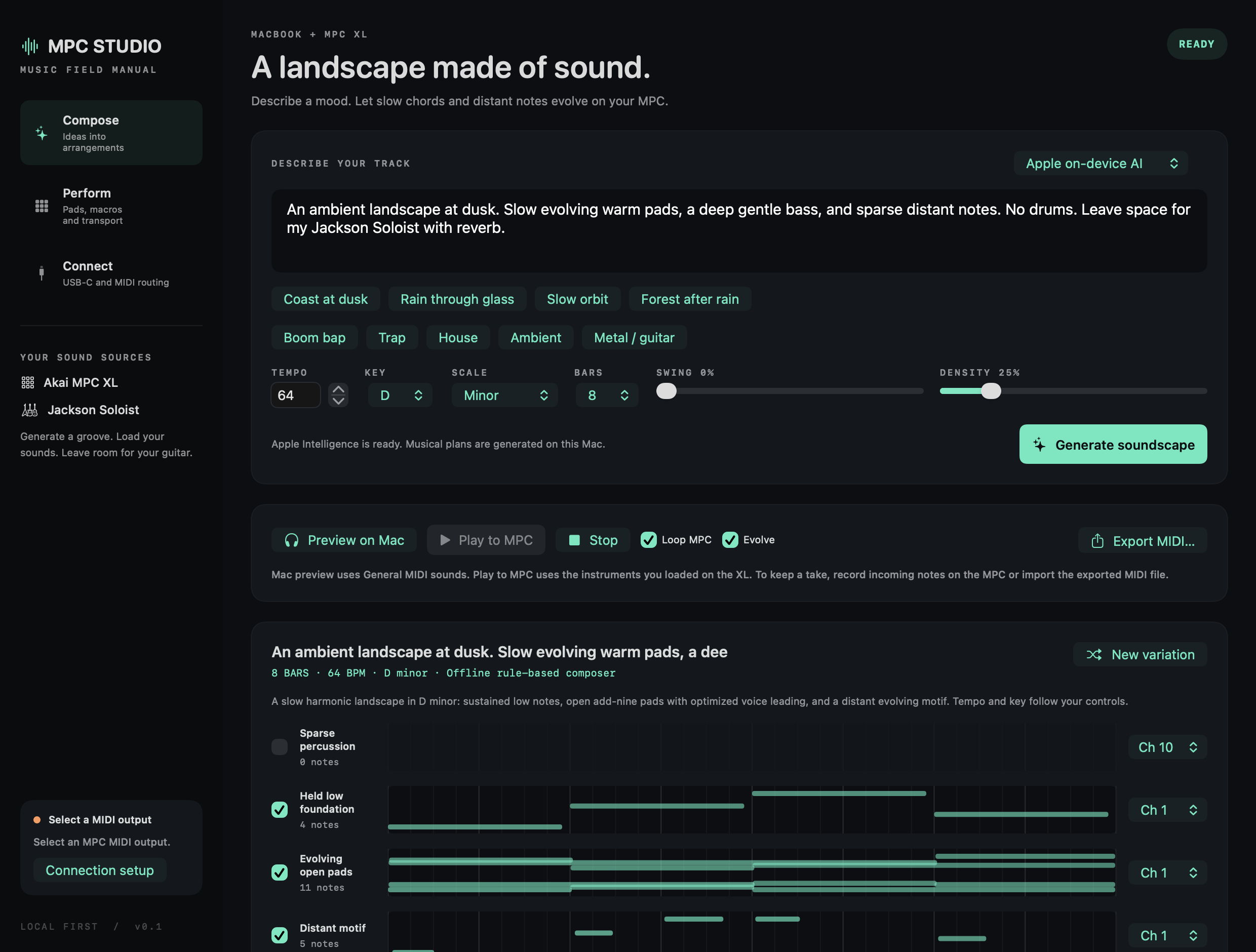
Load a pad or instrument on your MPC. The default ambient setup sends the musical parts to one MIDI channel, so you can explore before building a full project.
Loop a soundscape and enable evolving variations. Small changes in the notes and feel make space for listening, improvising, or finding the next idea.
Change key, tempo, density and swing. Split the parts across MPC tracks, perform with pads, or export the MIDI and keep shaping the music.
02 / A FEW STARTING POINTS
AI turns your description into a musical plan. The offline engine works from musical rules, your controls and simple prompt keywords. Each route gives you editable notes.
A slow, hazy soundscape in D minor. Warm chords, glassy notes, a quiet pulse, and lots of air.
Try a prompt like this in MPC Studio.03 / YOUR CHOICE OF ENGINE
Start with the built-in engines.
Connect another model when you want to.
Use the language model already on your Mac to turn a feeling into a constrained musical plan. No API key is needed. Apple manages the model's compute.
Generate on the CPU without a model or generation service. Seeded phrases and chord movement respond to your controls. The native app also recognizes simple directions such as “sparse” or “no drums.”
Connect a locally installed model through Ollama or LM Studio, with GPU use configured in that server. MLX is an Apple Silicon option. Or choose a compatible HTTPS cloud endpoint and your own key.
The Mac app's engines feed one MIDI renderer, with open chord inversions, smooth voice movement and seeded motif development. The Windows browser has its own CPU music engine. CPU code arranges notes and schedules MIDI; your local model server controls GPU offload and memory use. Your MPC supplies the sound.
These engines design MIDI arrangements, not neural waveform audio. Built-in generation keeps musical directions on your computer. A custom model receives them only when you generate or evolve music with that engine selected.
04 / YOUR FIRST SOUNDS
A short setup on the hardware.
Then a little room to experiment.
Download and unzip MPC Studio on an Apple Silicon Mac with macOS 26 or later. It selects on-device AI when Apple's model is ready, or the offline engine otherwise. Check the composer picker before generating.
For AI, enable Apple Intelligence and allow its model to download. This build is locally signed and not notarized. If macOS blocks the first launch, review the app and use System Settings → Privacy & Security → Open Anyway.
Connect the MPC XL's USB-C computer port with a data cable. Keep it in Standalone mode and load a plugin, keygroup, or drum kit. The app looks for MPC MIDI destinations automatically.
On the MPC, enable Track for USB MIDI Port 1 in MIDI/Sync. Set your loaded track's MIDI input to that port, channel 1, with In or Merge monitoring. Generate a soundscape, preview it on the Mac, then play it on the MPC.
Mac preview uses a General MIDI sound bank. Your MPC plays the sounds you load and route. A USB connection alone does not load an instrument or prepare a track.
To keep the notes, export MIDI or record incoming MIDI into your prepared MPC track. CC and transport controls need the corresponding MIDI Learn or Receive MMC setup. Leave external MIDI clock off when recording guitar or sampling audio: the MPC manual says audio recording is disabled while receiving MIDI Clock.
A NEW IDEA, WAITING TO HAPPEN
On your Mac or in a Windows browser. A companion to the instrument you already have.
Early release. Apple on-device generation and MIDI rendering have been tested on a Mac. Physical MPC playback and optional model-provider connections still need end-to-end validation; protocol fixtures do not establish those results. Locally signed, not notarized. Unofficial software, not affiliated with Akai, inMusic, Jackson or Fender. Source available under the repository's PolyForm Small Business license.