Start with the task and the kind of data you have. These are independent research tools, alongside the official Vesuvius software. They do not replace the organizers’ pipeline or expert reading.
Explore before installing.
UNROLL / BROWSER VIEWER
See the shape of the problem
Rotate published scroll geometry, scrub an unrolling timeline and inspect available X-ray and ink layers. Unroll displays published data and predictions; visiting it does not train a new model.
Needs: a modern browser and network access. Available layers vary by sample.
Compare the organizers’ 3D models on small CT cubes. Begin with a gallery cube and distinguish the scan from model layers. This is model exploration, not a readable flattened page.
Needs: network and available hosted compute. Jobs may queue, be unavailable or fall back to CPU.
Workbench is the toolbox. Starter is the front door.
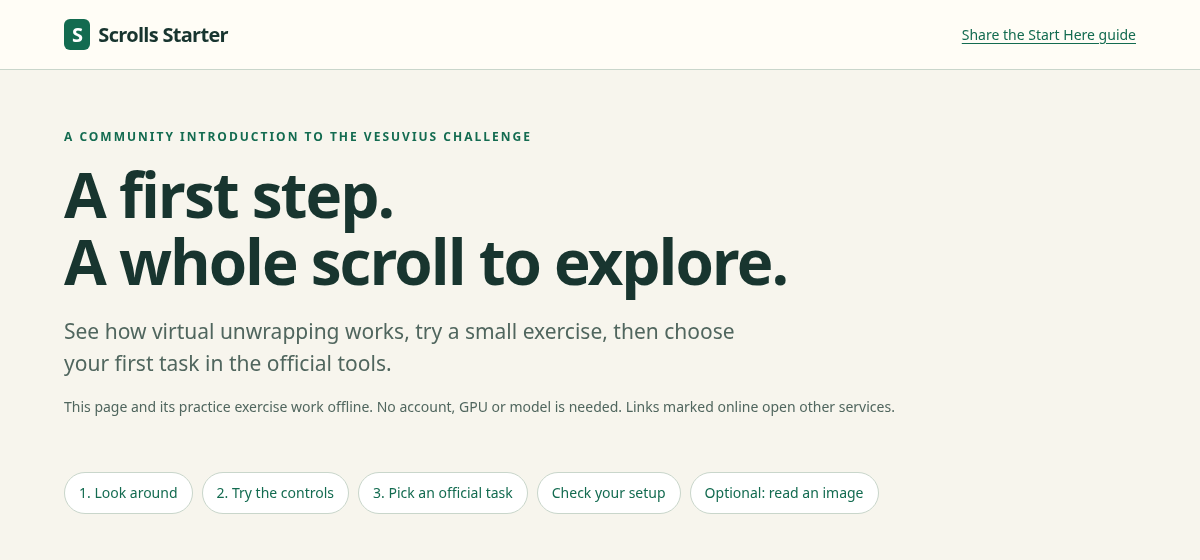
Scrolls Workbench 0.4.1 is an installable Python toolbox for practice, image inspection, text suggestions, scoring and records. Its commands use python -m kit. Scrolls Starter is a local browser page that teaches the stages, runs a synthetic control exercise and prepares reader commands.
The released Workbench 0.4.0 portable Starter. A screenshot of a real interface, not a proposed dashboard.
The portable HTML works offline after download and explicitly leaves computer setup not checked. The installed Starter can create a real snapshot of its Python environment. The base exercise needs no NumPy, Tesseract, VC3D or GPU. The optional reader has separate dependencies.
The workbench also contains image-viewing, scoring and recordkeeping commands. Use its tool index to check the scope of each command. A generated command is a plan, not an executed result; the browser form cannot inspect your filesystem or guarantee that your chosen output names are unused.
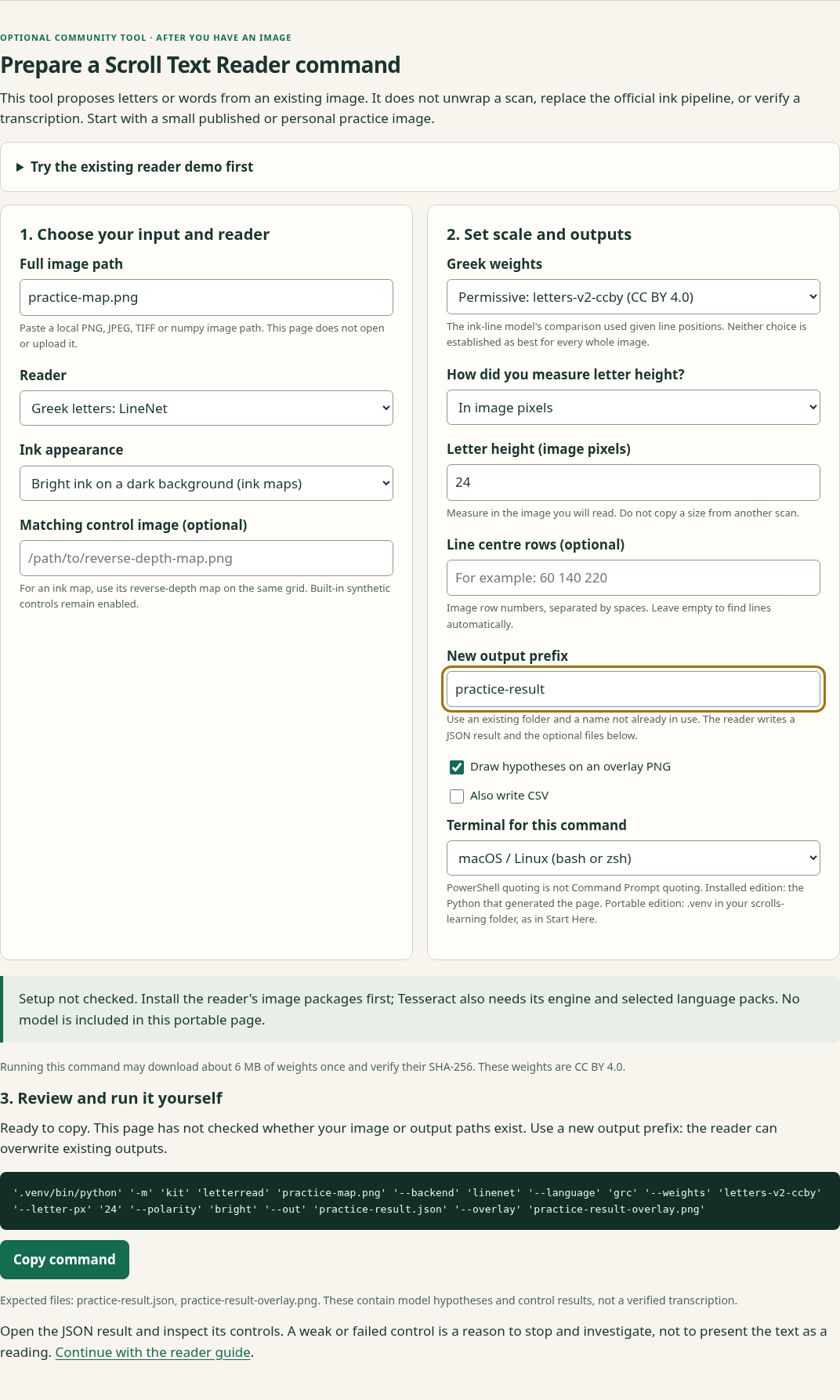
Scroll Text Reader, formerly Greek Letter Reader, starts with an existing two-dimensional image. It does not convert raw CT into text. Its NumPy model proposes Greek capitals, with positions, confidence information and controls; optional local Tesseract handles the language packs you install separately.
Input
A small ink map or other image, a measured letter scale and, where available, the matching reverse-depth map.
Output
A JSON result and optional overlay or CSV. Model and weight provenance travel with the result.
Compute
The Greek model runs on CPU. Its first use can download roughly 6 MB of hash-checked weights. The synthetic demo checks installation.
Language & license
Given-line research defaults to letters-v2-real (CC BY-NC 4.0); automatic layout uses letters-v2-ccby (CC BY 4.0). Tesseract is a separate local dependency, not a newly trained multilingual scroll model.
Example filenames and a generated command only. No image was opened and this command was not run for the screenshot.
A “strong” status is not a verified reading. Rows of non-letter strokes can pass the reader’s texture controls. Inspect images, line placement, physical scale and reverse/null results, then ask a qualified reader. Photographic and whole-page accuracy must not be inferred from supplied-line results.
Inkfilter 0.1.0 processes a local surface-volume window with fixed image operations and no learned weights. It combines alpha compositing, the papyrus-to-air edge step and fine texture, then removes a broad background and smooths the result. The default numerical recipe is frozen.
Input is a local (Z, H, W) NumPy, TIFF or Zarr array. It writes a forward float32 score map, a reversed-depth map and a JSON record. The scores are not calibrated probabilities. It performs no network requests during filtering; installation may contact a package index.
The high-z face is the assumed ink side: check depth orientation before using the output. The recipe was selected at approximately 4.8 micrometres per pixel, so other scales need evaluation. TIFF stacks load fully before cropping, and multiple arrays consume memory. Begin with its synthetic demo, then choose a bounded window; real adapter runtime and peak RAM were not measured in the release check.
The standalone package is released on its own public branch as scrolls_inkfilter, separate from Workbench’s kit. Its original code is Apache-2.0; referenced data and upstream methods retain their own licenses.
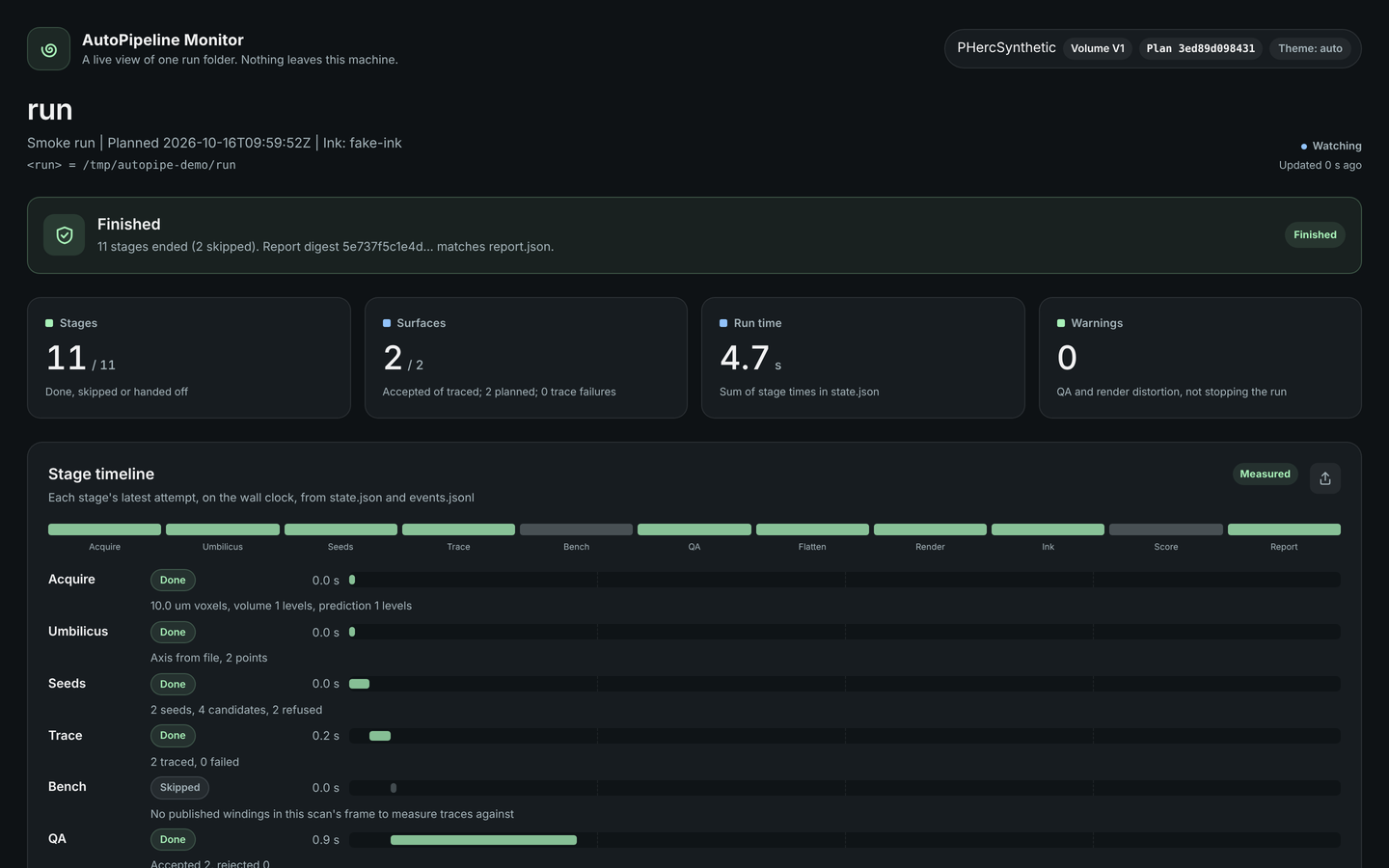
AutoPipeline 0.1.4 connects tracing, rendering and ink-detection tools and keeps plans, stage outputs and controls together. Its optional monitor makes progress visible. Start with the released synthetic demo, which uses stand-in tools and a made-up scroll.
Actual AutoPipeline synthetic-demo monitor. Its timing is for stand-in tools, not a real scroll, GPU inference or an end-to-end reading benchmark.
Install it in a separate virtual environment: AutoPipeline and Workbench both install a Python module named kit. Real use needs the official tools, compatible model environments, data storage and a compute plan. Synthetic success verifies orchestration; it does not verify the real binaries, geometry or ink accuracy.
The same command-line interfaces can run without a desktop. Workbench setup can emit JSON with python -m kit start --check; --no-open creates a Starter page without opening a browser. Reader JSON records its model, settings and control outcomes. Inkfilter writes a record beside its map pair, and AutoPipeline’s released guide documents planning, execution and monitoring.
Inspect before execution. Read --help, validate local files and choose new output locations. A setup report is a snapshot of one environment.
Keep inputs comparable. Record the sample, crop, axes, resolution, model or recipe and code version. Evaluate forward and control maps on the same population.
Retain failures. A failing control, missing stage or unavailable tool is useful evidence. Do not turn a demo pass into a claim about real scroll performance.
Bound real work explicitly. Set storage, runtime and spending limits before data downloads or GPU jobs. A browser link or command suggestion is not authorization to launch one.
These records support reproducibility; they do not replace a frozen scientific evaluation plan or human assessment. Keep possible discoveries and sensitive research outputs out of public issue attachments. The contribution workflow describes how to handle a possible finding.
Public sources reviewed 18 October 2026. Hendrick Research is an independent contributor, not the organizer of the Vesuvius Challenge. Software, models and datasets have separate licenses. Public source and corrections. Screenshot sources and hashes.